Hints: viz: comments
PR0L1NE chooses what to draw automatically, but sometimes its guesses aren't what you want: a helper variable clutters the loop history, cur isn't recognized as a position in a list, a tree with parent pointers comes out as a list, or a list of lists is really a graph. A hint is a comment that tells it what you meant.
The quickest way to learn them is the Hints, step by step group in the Open… menu: ten examples, from one hint to all of them together.
# viz: hide temp
# viz: pointers nums: first, last
def rotate(nums):
    first, last = 0, len(nums) - 1
    while first < last:
        temp = nums[first]
        nums[first] = nums[last]
        nums[last] = temp
        first += 1
        last -= 1
A hint is a comment whose text starts with viz::
| Language | Hint comments |
|---|---|
| Python | # viz: ... |
| JavaScript and TypeScript | // viz: ... or /* viz: ... */ |
- It can go anywhere: on a line of its own, at the end of a line of code, at the top of the file. Hints apply to the whole program, not just the code near them, so a common style is to put them at the top. A hint in a string (
"# viz: hide x") isn't a comment, so it's ignored. - One hint per comment. Write several comments for several hints.
- Keywords aren't case sensitive, and spacing is flexible:
# VIZ: Hide a ,bworks.
The hints
| Hint | What it does |
|---|---|
viz: hide temp, scratch | Never draws these variables, in any frame, in the memory view or the loop history. Objects only they point at disappear too. Useful for helper variables, or self/this when it's noise. |
viz: show total, seen | Always includes these variables in the loop history, even when PR0L1NE would leave them out because they don't change during the loop. |
viz: pointers nums: lo, hi | Draws lo and hi as pointer markers under nums whenever they hold a whole number, for names the code never writes as nums[lo]. |
viz: pointers grid[]: col | The same, for a grid's columns: col is marked under a column of grid. (Use pointers grid: row for its rows.) |
viz: tree Node(left, right) | Draws objects of class Node as a binary tree, using left and right as the children, in both the memory view and the loop history. Other fields, like parent, are drawn as plain fields. |
viz: list Node(next) | Draws objects of class Node as a linked list in the loop history, using next as the link. Other fields, like prev or random, aren't drawn as links. |
viz: graph adj | Draws adj as a graph: a dict, a list of neighbor lists, an adjacency matrix or an edge list. self.adj or this.adj work too, or just the field name. |
viz: graph adj: seen, todo, here | The same, and also draws these variables on the graph, whatever they're called. Each is drawn by its type: a set fills nodes in, a list numbers them, a dict of numbers labels them, a variable holding a node gets a ▲ marker. |
viz: graph Node(neighbors) | Draws objects of class Node as a graph, with neighbors as the edges. It can be a list, a set, a dict (its keys label the edges) or a direct link. List several fields to use them all. |
viz: plain graph | Never draws graph as a graph, even though it looks like one. It's drawn as an ordinary dict or list instead. Takes variable or class names. |
viz: size n | Marks n as the input size, for growth runs. n must be set to a number at the top level of the program (n = 40000). viz: size n = 40000, k names several, with an optional full size to grow to. |
Names are the variable or field names as written in your code. Class names in tree, list and graph are what the canvas shows as the box title (a Python class name, or a JavaScript constructor name). If two hints name the same class or variable, the later one wins.
Graph options
Words between a graph hint's target and its colon change how the graph is read or drawn. Any number of them can be combined:
| Option | Effect |
|---|---|
directed, undirected | Draw arrowheads, or don't. Without either, a graph is undirected when every edge goes both ways. |
matrix | Read a list of lists as an adjacency matrix: m[i][j] is the edge from i to j. 0, False, None, -1 and infinity mean no edge. Other numbers are weights, and are shown unless every edge is 1 or True. |
edgelist | Read a list of (a, b) or (a, b, weight) as edges. Python tuples are read this way without the option. |
layered, force, circle | Lay it out in layers from top to bottom, force-directed, or in a ring. Without one, it's layered when that's possible, and force-directed otherwise. |
# viz: graph flights matrix directed circle: reach, cityWhen a hint is wrong
A hint that PR0L1NE can't understand doesn't stop your program. It's ignored, and you're told why in two places: a yellow banner at the top of the canvas (Hint on line 3: Unknown hint "colour blue". Hints are: hide, show, pointers, tree, list, graph, plain.) and a yellow squiggle under the comment in the editor, which you can hover. Each message shows the form the hint should take, such as viz: tree Node(left, right).
A hint that's well-formed but names something that doesn't exist (hide nmus) does nothing, since it may refer to a variable that only exists in some runs.
Learning hints with the examples
The Hints, step by step group has the same ten examples in every language. Each starts with its hints and a comment explaining what they change. Deleting a hint line and watching the canvas change is a good way to see what it does.
| Example | Hints | What it shows |
|---|---|---|
| 1 · hide | hide before, receipt | A running total, without the helper variables cluttering the loop history |
| 2 · show | show target | A linear search that keeps the value it's looking for in every row, though it never changes |
| 3 · pointers | pointers nums: read | Removing duplicates in place: read comes from enumerate(), so only the hint can mark it |
| 4 · grid pointers | pointers grid: r, pointers grid[]: c | Column sums: marking a grid's row and column when the code walks rows with for row in grid |
| 5 · tree | tree Node(left, right) | A binary search tree with parent links, drawn top-down instead of as a list |
| 6 · list | list Item(next) | A list whose items also have random links, followed along next only |
| 7 · graph | graph adj | A depth-first search over neighbor lists by number, with seen, stack, u and v drawn on it |
| 8 · graph options | graph flights matrix directed circle: reach, frontier, city, nxt | An adjacency matrix, read as a directed graph and drawn in a ring |
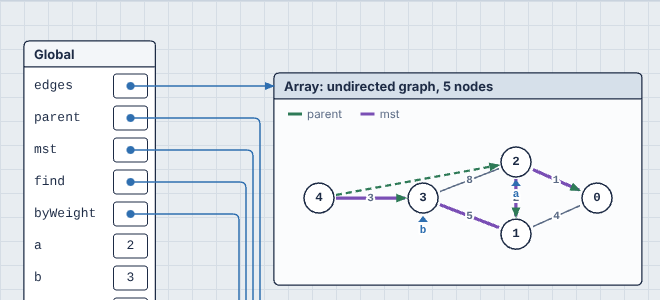
| 9 · edge list | graph edges edgelist undirected: parent, mst, a, b | Kruskal's algorithm: the union-find forest in green and the chosen edges in purple |
| 10 · all together | graph, plain, hide and show | Dijkstra on a road map with a closed road: costs, the frontier, the tree of best routes and the final route all on the graph |